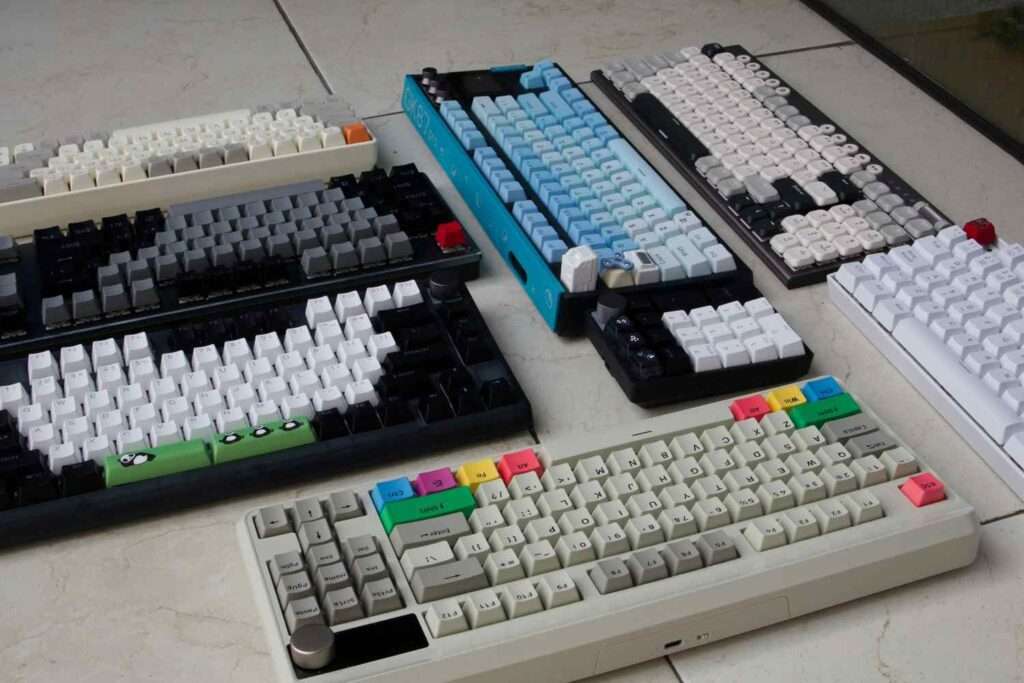
Types of Keyboard
Keyboards for computers are available in numerous designs and layouts, specifically crafted to meet various user needs across different applications. Multiple types of keyboards differ in their layouts, functionality, and usability to serve the diverse requirements of users. This article examines the major categories of keyboards based on these fundamental aspects.
Keyboard Types by Structure and Mechanism
When exploring keyboards, understanding their structure and mechanism becomes essential. Every keyboard has a distinct internal mechanism. This mechanism determines how each key responds when pressed. To understand the fundamental components and what is a keyboard, exploring its basic structure helps clarify how different types function.. The most common types include mechanical keyboard, membrane keyboard, magnetic keyboard, capacitive keyboard, and optical keyboard designs.
1. Mechanical Keyboard
Mechanical keyboards use individual switches beneath each key, featuring a metal spring and metal contacts inside every switch. When pressed, the key compresses the spring, allowing metal contacts to meet and send an electrical signal to the computer. These switches come in three main varieties: linear switches like the Akko V3 Cream Yellow Pro Switch that move smoothly without resistance, tactile switches such as the Akko V3 Cream Blue Pro Switch that provide a tactile bump during keystrokes, and clicky switches like the Akko Creamy Cyan Switch that produce audible clicks. For detailed reviews of mechanical switches and gaming keyboards, PC Gamer offers comprehensive testing and comparisons.
Many modern mechanical keyboards are hot-swappable, allowing users to change switches without soldering. The MonsGeek M1 V5 VIA Custom Mechanical Keyboard exemplifies this flexibility, letting users customize their typing experience. The M1 V5 VIA Custom Mechanical Keyboard offers programmable features alongside switch customization options.
Test your mechanical keyboard performance with our Keyboard Tester tool.
2. Membrane Keyboard
Membrane keyboards operate through three-layer membrane circuits consisting of a top membrane, conductive trace layer, and bottom membrane. When you press a key, it pushes down on the top membrane until it contacts the conductive layer, completing the circuit and registering input. The most common variants are rubber dome keyboard and scissor-switch keyboard designs.
3. Magnetic Keyboard
Magnetic keyboards rely on magnets for actuation instead of physical contact points. They use Hall Effect sensors or TMR sensors to detect changes in the magnetic field when keys are pressed. This magnetic field detection allows precise control over keystrokes, letting users adjust the trigger point and actuation force to their preference.
The Rapid Trigger feature in magnetic keyboards enhances responsiveness and speed, making them ideal for gamers who need instant reactions. Models like the MonsGeek M1 V5 TMR Magnetic Keyboard and M1 V5 TMR Magnetic Keyboard showcase this technology, with the Hall Effect Keyboard and TMR variants representing different approaches. This magnetic keyboard technology eliminates physical wear on components.
4. Capacitive Keyboard
Capacitive keyboards use electrostatic fields to register key presses without requiring direct contact. Capacitive sensors beneath the keycaps detect changes in the capacitance value when fingers approach or press keys, converting this change into an electrical signal. Topre stands out among brands producing premium capacitive keyboards.
These keyboards deliver a smooth keypress experience with exceptional build quality and comfort. The light actuation requires minimal force per keystroke, enabling responsive input that reduces finger fatigue. Their extended lifespan and stability against environmental factors justify their expensive price compared to conventional options.
5. Optical Keyboard
Optical keyboards eliminate mechanical contacts by using infrared sensors or laser sensors to detect key presses. Optical sensors positioned beneath the keycaps register when the key interrupts a beam of light, converting this light signal into an electrical signal. Gamers and professionals favor these keyboards for their exceptional speed and precision.
The absence of physical contact during keystrokes makes them highly durable, as there are no physical contact points to wear down over time. However, optical technology makes them expensive compared to traditional mechanical options, though the performance benefits often justify the investment.
Keyboard Types by Key Layout
Every keyboard features a specific key layout that determines where letters, numbers, and symbols appear. The most widely used designs include QWERTY keyboards, AZERTY keyboards, Dvorak keyboards, and Colemak keyboards. Each key layout serves different language requirements and typing efficiency goals.
1. QWERTY Keyboard
The QWERTY layout remains the most recognized keyboard layout worldwide, originating from mechanical typewriters in the 1870s. This arrangement placed frequently used letters apart to prevent typewriter jams, eventually becoming the de facto standard for computer keyboards. Despite newer alternatives, QWERTY dominates global markets due to its widespread use in daily computing tasks, such as uses of keyboard.
2. AZERTY Keyboard
The AZERTY layout serves Franch-speaking countries, particularly France, where it addresses specific input needs of the French language. This design improves input efficiency for French accents, symbols, and key combinations commonly used in French text. Compared to QWERTY, AZERTY swaps the positions of certain letters: A trades places with Q, and Z exchanges with W, optimizing typing for French speakers.
3. Dvorak Keyboard
The Dvorak Simplified Keyboard prioritizes typing speed and comfort by positioning common letters under the strongest fingers. All vowels (A, O, E, U, I) appear on the left side, while frequently used consonants (D, H, T, N, S) sit on the home row. This strategic placement balances workload between left hand and right hand, reducing the distance fingers travel during typing.
By minimizing finger movement, Dvorak keyboards decrease fatigue and lower the risk of injury from repetitive strain. The ergonomic design makes it appealing for people who type extensively, though transitioning from QWERTY requires significant practice and dedication. TechRadar provides expert insights on alternative keyboard layouts and their real-world performance benefits.
4. Colemak Keyboard
The Colemak keyboard layout emerged as a modern alternative to the Dvorak keyboard, created by American computer engineer Cole Mak in 2006. It retains many QWERTY positions while offering key advantages in efficiency and comfort. Users need to learn fewer new keys compared to Dvorak, making it easier to use for those transitioning from QWERTY layouts.
Keyboard Types by Connectivity
The way a keyboard establishes connectivity with computers significantly impacts user experience and convenience. Two primary connection methods exist: wired keyboard and wireless keyboard options. Each connectivity type offers distinct advantages depending on usage requirements and environmental factors.
1. Wired Keyboard
A wired keyboard connects to a computer or device through a physical line, typically using either a USB interface or older PS/2 interface. Most modern wired keyboards feature plug-and-play functionality, requiring no additional software installation. The direct connection ensures superior transmission speed and universal compatibility across different systems.
Signal transmission through wired connections remains stable and reliable, eliminating concerns about signal interruption, interference, or delay during use. This accuracy and real-time performance make wired keyboards ideal for gaming. Understanding keyboard polling rate becomes crucial for gamers seeking minimal input delay and professional work where every user input matters. However, cables can limit portability and create desk clutter.
2. Wireless Keyboard
Wireless keyboards connect to a computer using Bluetooth or 2.4 GHz RF technology, offering greater flexibility and portability without restrictive cables. The wireless range typically extends several meters, making them convenient for presentations or media center setups. Users can position their device anywhere within signal reach.
Despite these advantages, wireless keyboards may experience occasional delays or signal interference from other electronic devices. They require batteries or regular charging to maintain energy supply. Wikipedia provides comprehensive technical information about wireless keyboard technologies and connectivity standards.. which can cause user inconvenience when power runs low unexpectedly. Battery management becomes an additional consideration for wireless keyboard owners.
Conclusion
Different keyboard layouts and classifications serve various standards. The advantages of keyboard vary significantly across different types, making informed selection important, across industries from specialized gaming keyboards to health-focused ergonomic keyboards.
Each design offers unique advantages suited to specific scenarios and user preferences. Whether choosing the familiar QWERTY layout, regional AZERTY, efficiency-focused Dvorak, or balanced Colemak, every option serves a distinct purpose.
Users should select a category that aligns with their needs, typing habits, and usage scenarios.Understanding these differences helps users make informed decisions. By using the keyboard counter, you can track your typing performance across various layouts and see which keyboard best enhances productivity, comfort, and overall performance.